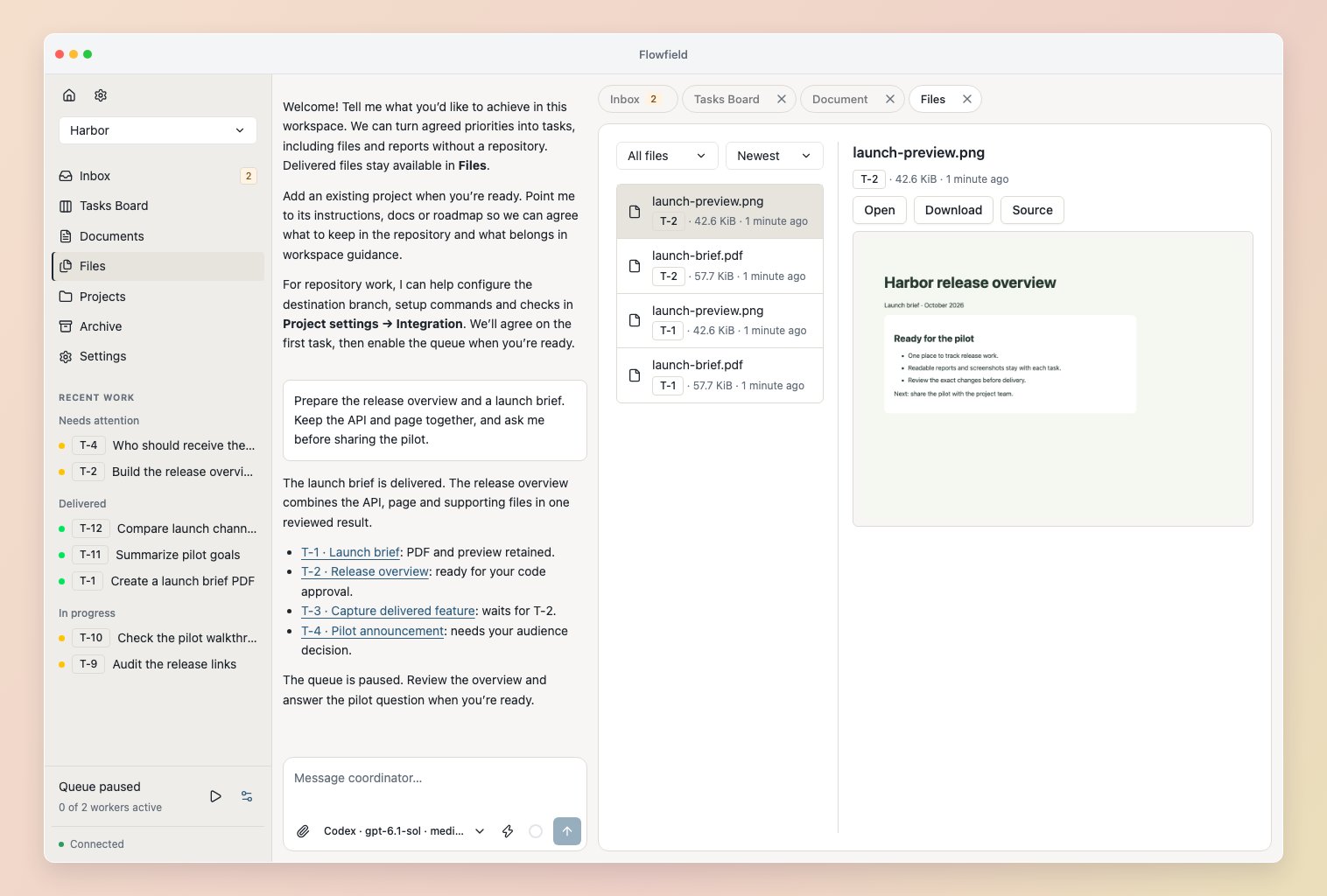
Browse and use results
Open Files in the sidebar. Above the file list, choose All files or a task and sort by name, newest or type. Browse folders with breadcrumbs; the selected file previews beside the list, or below it on narrow screens. Load more files continues the list. Repeated filenames remain distinct by submission time and source result. Use Source to open the exact result that submitted a file. Open and Download remain available when its format has no inline preview. Images, CSV, UTF-8 text, Markdown and source code preview inline. Choose Open for browser-supported files or Download for the original. HTML and SVG display as escaped source and download without executing in Flowfield.
Complete file/report tasks finish after their files are retained and any configured task reviewer signs off. Reviewers can request corrections or ask a focused question about missing input. Incomplete results stay unfinished. Open the exact result to request changes, or ask the Coordinator to reconcile missing input and prepare the follow-up. Completion records delivery; it does not endorse the report’s conclusions.
Inputs and later versions
The Coordinator can select sent message attachments or previously submitted files as task inputs. Workers receive separate copies of those exact bytes. Delivered prerequisite files are also supplied automatically. Later edits or successor results cannot silently replace the inputs of an existing attempt. Reopening a completed task preserves its previous files and result history. For decomposed work, the final task result contains its contributions’ retained files. The task reviewer checks the combined outcome. Earlier file versions remain accessible after corrections.Worker and coordinator tools
Create repository-free work withcreate_task(workspace_id=…, task=…), omitting project_id, and prepare it with completion="report". Built-in Coordinator tools already bind the workspace. Subsequent task tools use the same workspace_id and task key. Select immutable file IDs with task.input_files.
Workers write final files in the supplied output_directory, also available as FLOWFIELD_OUTPUT_DIR, and include relative paths and optional descriptions in submit_result.files. Only explicitly submitted files are retained. A submission supports up to 32 regular files, 128 MiB per file and 512 MiB total. Symlinks, hardlinks and paths outside the output directory are rejected. Finish writing files before submitting; a failed capture leaves the result unsubmitted so the worker can correct it.
Use list_workspace_files for bounded browsing, optionally filtered by task key. get_workspace_file returns metadata and a verified local path. Inputs are limited to 32 explicitly selected files; with prerequisite and predecessor files, an attempt can receive up to 256 files and 512 MiB. Combined task outputs are bounded to 256 files and 512 MiB.
Retention and backup
Submitted bytes live under<data-root>/workspaces/<workspace-id>/outputs/, separately from disposable attempt directories. Files survive task archiving, attempt cleanup and service restart. New versions have new identities; no automatic output deletion is performed.
Back up the entire service data directory to retain both metadata and files. A database copy alone does not contain the file bytes. If a retained file is missing or changed, Flowfield preserves its metadata and reports the problem; restore the original bytes from backup. See local storage.